
Download Streak – Gmail CRM, free, secure, email tracking tool
Overview of Streak CRM
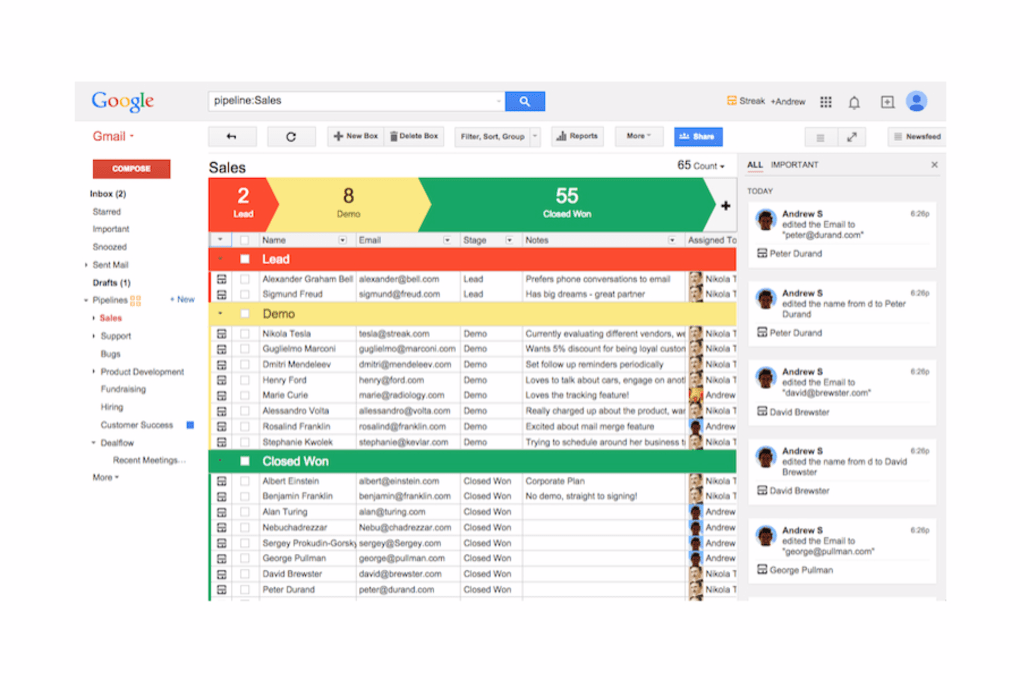
Streak is a Gmail‑based Customer Relationship Management (CRM) solution that transforms your inbox into a powerful sales and support hub. By embedding directly into the Google Workspace environment, Streak eliminates the need for a separate desktop application or a complex server setup. Users can track emails, manage pipelines, and collaborate with teammates without ever leaving the familiar Gmail interface.
The platform offers a free tier that covers basic contact and deal tracking, making it an attractive option for freelancers, small teams, and startups that need a lightweight yet professional CRM. For larger organizations, the paid plans unlock advanced automation, deeper reporting, and unlimited custom fields, all while maintaining the same seamless integration with Gmail. Because Streak lives inside the cloud, all data is stored securely on Google’s infrastructure, benefitting from the same encryption and redundancy standards that protect your regular emails.
The software also supports real‑time syncing across devices, ensuring that sales representatives always have up‑to‑date client information whether they are working from a Windows PC, a macOS laptop, or a mobile device running Android or iOS. In short, Streak delivers a professional CRM experience that feels like a natural extension of Gmail, allowing teams to stay organized, respond faster, and close more deals without the overhead of traditional CRM installations.
Key Features and Integration Capabilities
- Email Tracking: See when recipients open your messages, click links, or reply, with real‑time notifications directly in Gmail.
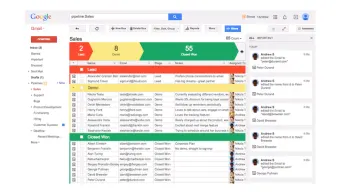
- Pipeline Management: Create visual pipelines for sales, recruiting, or project tracking, and move deals between stages with a simple drag‑and‑drop.
- Custom Fields & Templates: Build unlimited custom fields and reusable email templates to standardize communication and capture the data that matters most.
- Mail Merge & Bulk Actions: Send personalized mass emails while automatically linking each outreach to the appropriate contact record.
- Google Workspace Integration: Works seamlessly with Google Calendar, Google Drive, Google Meet, and Google Docs, allowing you to attach files, schedule meetings, and log notes without leaving the CRM.
- Collaboration Tools: Share pipelines with teammates, assign tasks, and add internal comments that are visible only to your team.
- Automation & Workflows: Set up triggers that automatically update fields, send follow‑up emails, or move deals based on predefined criteria.
- Secure Cloud Storage: All CRM data is stored in Google’s encrypted cloud, benefiting from the same compliance certifications (ISO 27001, SOC 2, GDPR) as Gmail.
- Mobile Apps: Dedicated iOS and Android apps keep you connected to your pipelines on the go, with push notifications for important events.
- Free Tier & Scalable Pricing: The free version supports up to 500 contacts, while paid plans start at $15 per user per month, with a 10 % discount for annual billing.
The breadth of these features makes Streak more than just a contact list; it functions as a full‑fledged CRM that respects the workflow habits of Gmail power users. Because it is built on the Google platform, adding new Google apps or third‑party extensions is typically a matter of enabling a permission rather than writing code. This extensibility ensures that as your organization adopts new tools—such as Google Forms for lead capture or Google Data Studio for advanced analytics—Streak can integrate quickly and keep your data in sync.
Installation, Usage, and Compatibility
Getting started with Streak is intentionally straightforward. The installation process begins with a single click from the Chrome Web Store or the official Streak website. After granting the required permissions, Streak injects a small sidebar into Gmail, instantly turning the email client into a CRM dashboard. No separate executable files, admin rights, or IT involvement are required, which makes the tool ideal for distributed teams and remote workers.
Once installed, the first step is to create a pipeline that mirrors your business process—whether it’s a sales funnel, a recruitment pipeline, or a customer support queue. The intuitive “Create Pipeline” wizard guides users through naming stages, adding custom fields, and selecting a template. After the pipeline is live, you can start converting existing Gmail threads into CRM records with a single click, preserving the entire email history for future reference.
Streak is compatible with all major operating systems that support Google Chrome or any Chromium‑based browser, including Windows 10/11, macOS Catalina and later, Linux distributions, as well as Chrome OS. Mobile compatibility is provided through native iOS and Android applications, which sync automatically with the web version. Because the application relies on the browser’s extension model, updates are pushed automatically by Google, ensuring you always have the latest security patches and feature enhancements without manual intervention.
Using Streak on a daily basis involves a blend of email workflow and CRM actions. When you compose or receive an email, the Streak sidebar displays relevant contact information, pipeline stage, and any pending tasks. You can add notes, set follow‑up reminders, or change the deal’s status directly from the email view. For teams, the collaboration features let you @mention colleagues, assign owners, and track activity logs, fostering transparency and accountability across the organization.
Overall, the combination of a frictionless installation, cross‑platform support, and tight integration with Google Workspace makes Streak a low‑maintenance yet high‑impact solution for businesses that rely heavily on email communication.
Pros, Cons, and Frequently Asked Questions
Pros
- Deep native integration with Gmail eliminates the need for a separate CRM dashboard.
- Free tier sufficient for small teams and individual professionals.
- Real‑time email tracking and read receipts improve follow‑up efficiency.
- Customizable pipelines and fields adapt to any business workflow.
- Secure cloud storage leverages Google’s robust security and compliance.
- Mobile apps keep pipelines accessible on iOS and Android devices.
- Automation rules reduce manual data entry and keep records up‑to‑date.
Cons
- Requires a Google account; organizations using alternative email providers must adopt Gmail.
- Advanced reporting and analytics are limited compared to dedicated enterprise CRMs.
- Performance can be impacted by browser extensions or heavy inbox loads.
- Some users report a learning curve when configuring complex automation workflows.
FAQ
Is Streak completely free for unlimited users?
Streak offers a free tier that supports up to 500 contacts and basic pipeline features. Unlimited users and advanced functionality require a paid subscription.
Can I use Streak with Outlook or other email clients?
Streak is built exclusively for Gmail and Google Workspace. While you can forward Outlook emails into Gmail, native CRM features are only available within the Gmail environment.
How secure is the data stored in Streak?
All data resides on Google Cloud, benefiting from encryption at rest and in transit, ISO 27001, SOC 2, and GDPR compliance. Administrators can also enforce two‑factor authentication for added security.
Can I import existing contacts from another CRM?
Yes. Streak provides CSV import tools that map fields from most popular CRMs, allowing you to migrate contacts, deals, and notes quickly.
Is there a way to automate follow‑up emails?
Streak’s automation engine lets you set triggers—such as “when a deal moves to ‘Negotiation’”—to send predefined follow‑up emails automatically.
Review Summary: Streak delivers a surprisingly powerful CRM experience within Gmail, making it ideal for sales teams that live in their inbox. While it lacks deep analytics, its ease of use, free tier, and secure Google‑backed infrastructure outweigh the limitations for most small‑to‑mid‑size businesses.
Conclusion and Call to Action
In an era where email remains the primary channel for customer interaction, Streak bridges the gap between communication and relationship management without forcing users to learn a brand‑new platform. Its native Gmail integration, robust feature set, and generous free offering make it a compelling choice for startups, freelancers, and growing teams that need a CRM they can adopt instantly. While power users may eventually outgrow its reporting capabilities, the low barrier to entry and secure cloud foundation ensure that Streak will remain a valuable tool for many organizations. Ready to streamline your sales pipeline directly from your inbox? Download Streak today and start converting emails into actionable deals within minutes.



.png)



